Reading a Report
A completed Novelty Analysis Report has several sections. This page walks through each one in the order they appear.
Query
The query section shows the exact invention description you submitted. It is preserved as-is so you know exactly what was analyzed.
Executive Summary
The executive summary is the first major section. It contains two parts:
Patentability verdict: Either “Patentability: High” or “Patentability: Low”. This is a summary judgment based on the prior art found.
Verdict explanation: A paragraph describing the reasoning behind the verdict. It references the strongest prior art, notes which features of your invention are well-represented in existing patents, and highlights areas where novelty may exist.
Read the explanation carefully. The verdict alone does not tell the full story. “Patentability: Low” with a narrow set of overlapping features may still leave room for a patentable claim. Discuss the explanation with a patent attorney before drawing conclusions.
Key threats to patentability
A bulleted list of specific findings that challenge the novelty of your invention. Each item names a prior art issue or directly references a patent. These are the findings most likely to be raised during prosecution.
Recommendations
Suggestions for how to improve patentability prospects. These might include:
- Narrowing claims to focus on features not well-represented in the prior art
- Combining features in a way that distinguishes from specific patents
- Emphasizing the technical problem solved, not just the solution
Recommendations are AI-generated and should be treated as a brainstorming starting point, not legal advice.
Query analysis
The query analysis section shows how GoVeda interpreted your description. It includes:
| Field | What it contains |
|---|---|
| Technical Domain | The technology area the invention falls into |
| Core Innovation | A concise summary of the inventive concept |
| CPC Classifications | Cooperative Patent Classification codes assigned to the invention |
| IPC Classifications | International Patent Classification codes |
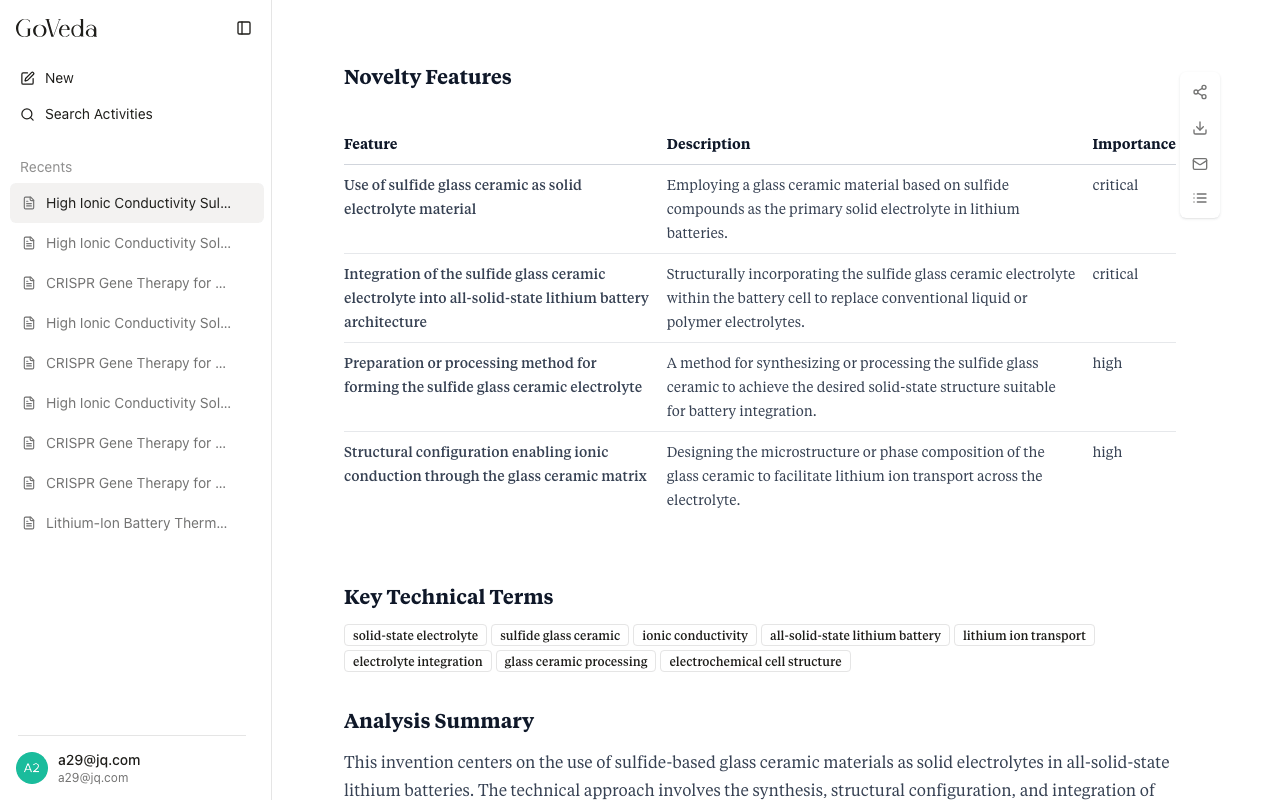
| Novelty Features | A table of discrete features identified in your description, each with a name, description, and importance rating |
| Key Technical Terms | Key vocabulary extracted from your description |
| Analysis Summary | A paragraph summarizing how GoVeda interpreted the invention before searching |
The CPC and IPC codes show which technology categories were searched. If the codes look wrong, your description may have been too vague or used terminology from a different domain.
The Novelty Features table is particularly useful. It shows which individual aspects of your invention were treated as distinct elements for comparison purposes.
Prior art analysis
This is the core of the report. Patents are divided into two groups:
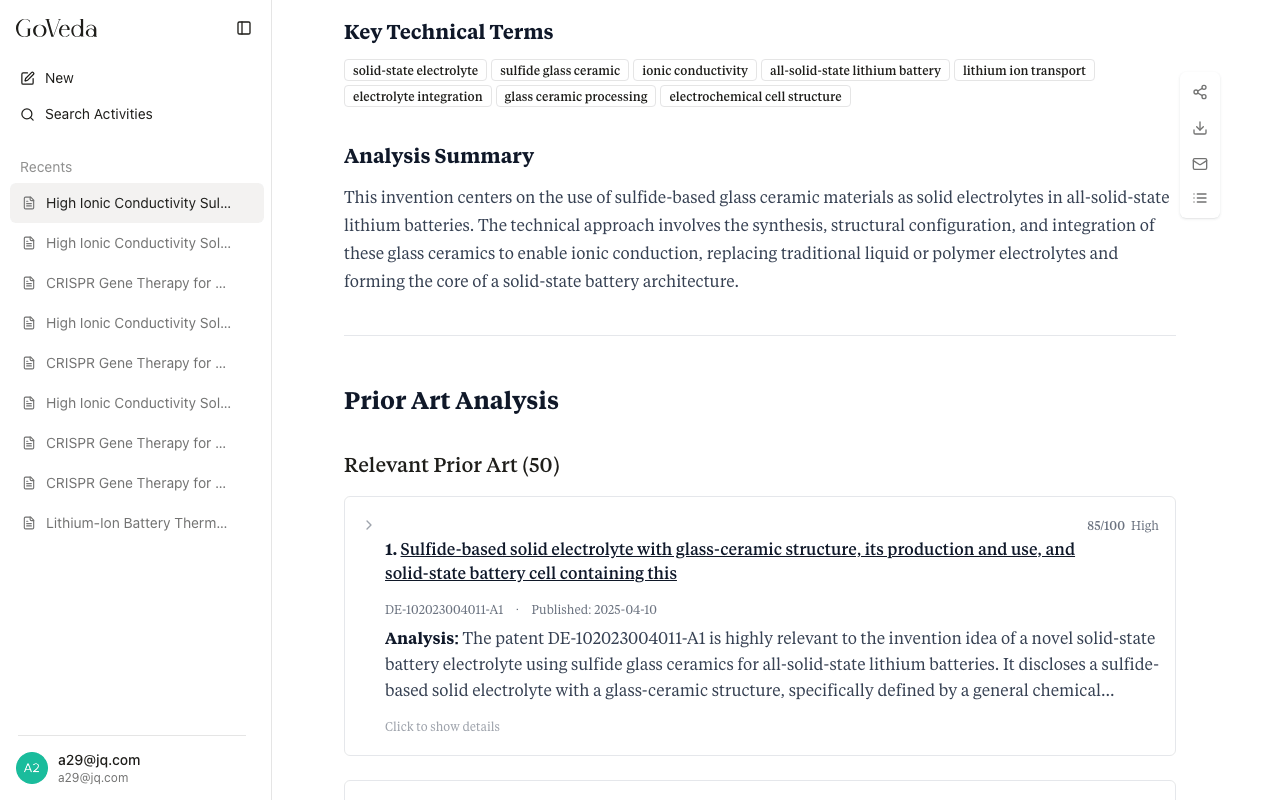
Relevant Prior Art — Patents determined to be materially similar to your invention. These are sorted by relevance score (0-100). Expand any patent card to see the full analysis.
Other Analyzed Patents — Patents reviewed but found not relevant. These are collapsed by default. Click “Show” to expand them.
Reading a patent card
Each prior art card shows:
- Title — Linked to the full patent page (for unlocked reports)
- Patent number — In standard UCID format (e.g., US-10123456-B2)
- Publication date
- Relevance score — A 0-100 score indicating how closely the patent matches your invention
- Blocking potential — A qualitative label (e.g., “high”, “medium”, “low”)
- Analysis summary — A paragraph explaining how this patent relates to your invention
Click the card header to expand it and see:
Relevant Excerpts — Quoted claim language or description text from the patent, with an explanation of why each excerpt is relevant to your invention.
Technical Overlaps — Features your invention shares with this patent.
Key Differences — Ways your invention differs from this patent. These differences are where patentability arguments tend to be built.
Novelty Feature Analysis — A table mapping each novelty feature from your Query Analysis against this patent, showing whether the feature is present in the patent and citing the relevant claim language.
Novelty Assessment Summary — A concluding paragraph on whether and how this patent affects the novelty of your invention.
Patent citations
A formatted reference list of all relevant patents, with patent numbers linked to the full patent page. Useful for copying into a patent application or sharing with counsel.
Disclaimer
The report closes with a reminder that AI-generated analysis should be reviewed by a qualified patent attorney before making patentability decisions. GoVeda reports are not legal opinions and should not be treated as a substitute for professional legal counsel.
Navigation
A table of contents button (the list icon in the top-right toolbar) lets you jump between sections. When viewing a long report, it also shows the relevance scores for each patent in the Prior Art Analysis section.