Understanding Results
After a semantic search completes, GoVeda displays a paginated list of the most relevant patents. This page explains what each result shows and how to work with the results page.
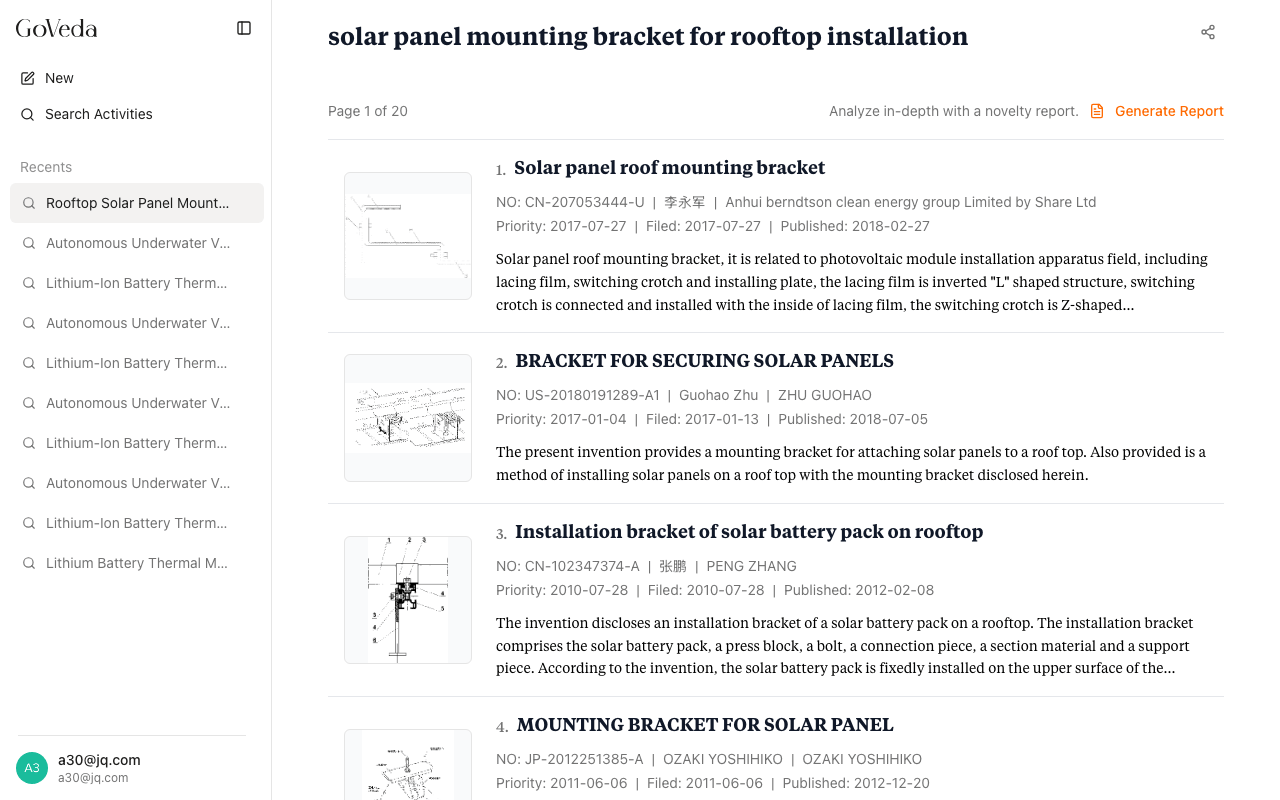
Results page layout
The results page has two main sections:
- Search header — Shows your original query and a share button (for logged-in users)
- Results list — Patent cards ranked by relevance, with pagination below
A summary line above the list shows which page you are on and the total number of pages.
What each result card shows
Every result card displays the following information:
| Field | Description |
|---|---|
| Rank | Position in the results list (1, 2, 3, …) |
| Title | Patent title as published |
| UCID | Unique identifier in country-number-kind format (e.g., US-7654321-B2) |
| Inventor | First listed inventor on the patent |
| Assignee | Organization that owns the patent |
| Priority date | Earliest priority date, which determines novelty cutoffs |
| Filed | Application filing date |
| Published | Publication date |
| Abstract | First few sentences of the abstract (truncated to three lines) |
If a patent has no abstract, the card shows an excerpt from the description or claims instead.
How results are ordered
Results are ranked by relevance to your query. The patent whose full text is most semantically similar to your query appears first. GoVeda’s ranking pipeline runs in two stages:
- Initial retrieval — A broad scan of the patent database using vector similarity
- Reranking — A second-pass model refines the ordering to improve precision
The result ranked first is the patent GoVeda considers most related to your query. There is no separate numerical relevance score displayed on the card — the rank position reflects the score.
Navigating results
Opening a patent. Click anywhere on a result card to open the Patent Viewer for that document. The viewer shows the full text, claims, drawings, and legal status.
Going back. Use your browser’s back button to return to the results list. Your position on the page is preserved.
Next and previous within a patent. When viewing a patent opened from search results, navigation arrows appear to move to the next or previous patent in the list without returning to the results page.
Pagination
Results are shown 10 per page. If your search returns more than 10 patents, a pagination control appears at the bottom of the list. Click a page number or the Previous/Next arrows to move between pages.
The total number of results and your current position (e.g., “Page 2 of 8”) appear at the top of the list.
Generating a report from search results
At the top of the results list, a Generate Report link opens a dialog to start a Novelty Report using your search query. A report performs a deeper analysis and is useful after you have reviewed the search results and want a structured patentability assessment.
See Novelty Reports for details.
If no results appear
GoVeda may return zero results for queries that are very narrow or use terminology not present in the database. Try broadening the description, using different technical terms, or splitting a multi-concept query into separate searches.