How to Use AI to Find Prior Art Faster
Traditional patent search has three structural problems that no amount of Boolean expertise fully solves. AI-powered semantic search addresses all three. This article explains how it works and how to use it effectively.
Why Traditional Search Falls Short
The synonym problem
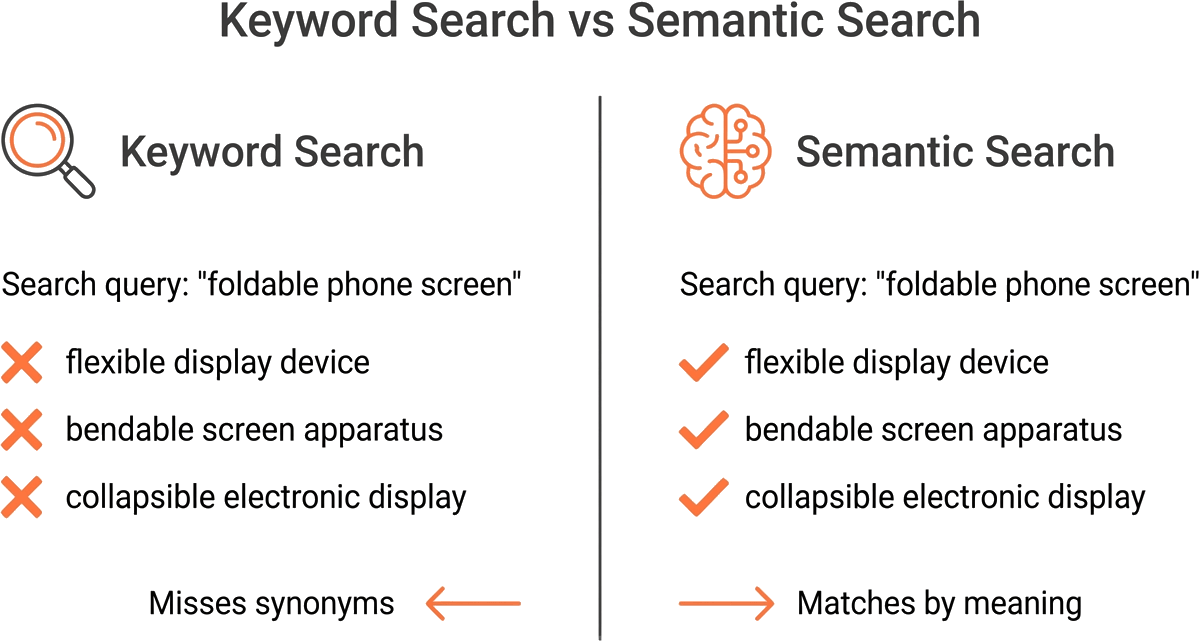
The same technology can be described in dozens of ways. “Machine learning” appears in patents as “artificial intelligence,” “neural network,” “deep learning,” “pattern recognition,” “statistical classification,” “predictive modeling,” and more — depending on who wrote the application, when it was filed, and which patent office received it.
A keyword query cannot anticipate every variant. Every term you miss is a blind spot. In cross-disciplinary fields — where concepts from one domain appear in patents classified under another — the problem compounds.
The volume problem
There are over 220 million published patent documents worldwide, and the number grows by thousands every day. A keyword search in a broad technology area might return 50,000 results. No one is reading 50,000 abstracts. In practice, searchers review the top 50 to 200 results and hope the relevant ones floated to the top. Often they did not.
The language problem
Patents are filed in dozens of languages across 108+ jurisdictions. A keyword search in English does not find the Chinese patent that describes the same method using entirely different characters. An inventor in Germany, filing at the EPO in German, might hold the closest prior art to your invention — and your English keyword search would never surface it.
How AI Patent Search Works
Embedding models
AI patent search starts with embedding models — neural networks trained to convert text into numerical vectors (arrays of hundreds or thousands of numbers). These vectors capture the meaning of the text, not just its words. Two descriptions of the same concept produce vectors that are close together in vector space, even if they share no words in common.
When GoVeda indexes a patent, the embedding model processes its text and stores the resulting vector. When you submit a search query, the same model converts your query into a vector. The system then finds the patent vectors closest to your query vector — a mathematical operation called nearest-neighbor search.
Semantic matching
The result is search by meaning. “A method for detecting road obstacles using reflected laser pulses” matches patents about lidar-based object detection even if those patents never use the word “lidar.” The model learned during training that these descriptions refer to the same concept.
This is the fundamental advantage: semantic search does not require you to guess the right words. You describe what you are looking for, and the system finds conceptually similar documents.
Multilingual understanding
Modern embedding models are trained on text in many languages simultaneously. The model learns that a Chinese patent describing 基于激光雷达的障碍物检测 and an English patent describing “lidar-based obstacle detection” refer to the same concept. You search in English; the system returns relevant results regardless of the language they were filed in.
AI Search in Practice with GoVeda
Step 1 — Describe your invention in plain language
Write a clear, detailed description of your invention. Include the technical mechanism, the problem it solves, and how it differs from existing approaches. More detail produces better results. “A battery cooling system” is too vague. “A method for cooling lithium-ion battery cells using a phase-change material embedded in a thermally conductive matrix between cell layers” gives the model enough signal to find precise matches.
Step 2 — Review ranked results with relevance scores
GoVeda returns results ranked by semantic similarity. The top results are the closest matches to your description. Review the first 20 to 30 results. Pay attention to:
- Which patents describe the same problem?
- Which patents use a similar approach?
- Which patents address different aspects of the same technology?
Step 3 — Drill into matches using Patent Viewer
For each relevant result, open the Patent Viewer to see the full patent: abstract, claims, description, drawings, classification codes, filing dates, and legal status. The structured display makes it easier to quickly assess relevance than reading a raw PDF.
Step 4 — Use Patent Chat to ask follow-up questions
For the most relevant patents, use Patent Chat to ask specific questions: “Does this patent cover [your specific mechanism]?” or “What are the key differences between this patent’s claims and [your invention]?” The AI reads the full patent text and answers with citations to specific passages.
Tips for Better AI Search Results
Be descriptive, not terse
Include technical details in your search query. Mention the materials, methods, architectures, and outcomes that characterize your invention. The more specific your description, the more precisely the embedding model can match it.
Search from multiple angles
Describe the same invention in different ways. One search might focus on the problem (“reducing thermal runaway risk in high-density battery packs”). Another might focus on the solution (“phase-change material cooling integrated into cell-to-cell interfaces”). Different framings surface different results because the model matches meaning from different angles.
Combine semantic results with classification codes
Look at the CPC/IPC codes assigned to your most relevant results. If the top five results all share CPC code H01M 10/6556 (cooling of battery cells), search that code directly to find patents that your semantic query may have missed. This combine-and-validate approach — covered in detail in patent search strategies — gives the highest recall.
AI-Powered Reports
GoVeda’s Patentability Report takes the search-and-analysis workflow and automates it. Describe your invention, and the system searches the database, identifies the most relevant prior art, compares each reference to your invention, and produces a structured report with a novelty verdict, key threats, and recommendations.
The report does not replace professional judgment, but it gives you a comprehensive starting point in minutes rather than days.
Try AI-powered search on GoVeda →
Disclaimer: This article is for informational purposes only and does not constitute legal advice. AI-powered search tools may not surface all relevant prior art — consult qualified patent counsel before making filing or prosecution decisions based on search results.