Introducing Patent Chat: Talk to Any Patent
Patent documents are hard to read. They are written in a specific style — long sentences, nested clauses, legal terms of art, cross-references between sections — designed for precision, not comprehension. A single claim can run to 200 words without a period.
Patent Chat lets you skip the deciphering and just ask questions.
What Is Patent Chat?
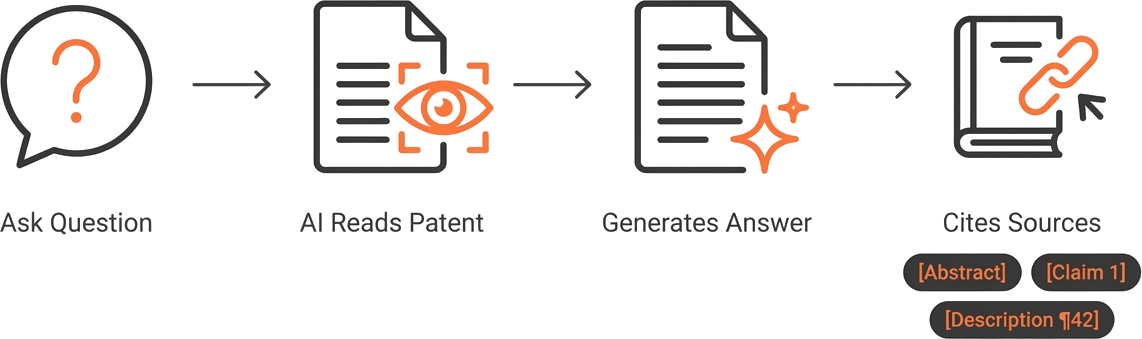
Patent Chat is a conversational AI interface built into GoVeda’s Patent Viewer. Open any patent, click the chat button, and start asking questions about the document. The AI retrieves relevant sections of the patent — claims, description, drawings — on demand and generates answers grounded in the actual content.
Every answer includes citation badges that link to the specific passages in the patent text. Click a citation to jump to the source. This is not a black box — you can verify every claim the AI makes against the original document.
Patent Chat is available to all logged-in GoVeda users at no additional cost.
What You Can Ask
Summarize the invention
“What does this patent cover?”
Get a plain-language summary of the invention — what it does, how it works, and what problem it solves. Useful when triaging search results and deciding which patents deserve a closer look.
Explain claims
“What is the scope of claim 1?” “What additional limitation does claim 5 add?” “What is the difference between claim 1 and claim 8?”
Patent claims define the legal scope of protection, but their dense, single-sentence structure makes them difficult to parse. Patent Chat breaks claims down into plain language while preserving their technical precision.
Compare inventions
“How does this patent’s approach differ from a method that uses ultrasonic sensors instead of lidar?” “Does this patent cover a system that uses Bluetooth instead of Wi-Fi?”
Describe your invention or product, and Patent Chat compares it against the patent’s disclosures. This is useful for preliminary infringement screening and for identifying where your approach diverges from the prior art.
Find specifics
“What materials are mentioned in the description?” “What is the claimed temperature range?” “Does this patent mention any specific machine learning architectures?”
Instead of searching through 50 pages of description, ask directly for the detail you need. Patent Chat locates the relevant passages and cites them.
How It Works
Patent Chat operates on the full text of the patent document. When you open a patent in the Patent Viewer, the AI can retrieve relevant sections — abstract, claims, description, and figure captions — as needed to answer your questions.
When you ask a question, the AI:
- Identifies the relevant sections of the patent
- Generates an answer based on the actual document content
- Attaches citation badges linking to the specific passages it drew from
- Maintains conversation context so you can ask follow-up questions
The conversation persists across sessions. You can ask an initial question, drill deeper, pivot to a different aspect of the patent, and come back to an earlier topic — the AI tracks the context throughout.
Use Cases
Prior art review
When conducting a prior art search, you may identify 20 to 50 potentially relevant patents. Reading each one in full is not practical. Patent Chat lets you quickly assess each patent’s relevance:
- “Does this patent describe [the specific mechanism in your invention]?”
- “What is the key technical contribution of this patent?”
- “Is the approach in this patent applicable to [your technology domain]?”
In two to three questions, you can determine whether a patent is a serious prior art threat or can be set aside.
Claim analysis
Understanding what a patent actually protects requires reading the claims — and claims are the hardest part of a patent to read. Patent Chat makes this accessible:
- “Break down claim 1 into its individual elements.”
- “What does ‘means for transmitting’ refer to in claim 3?”
- “Which dependent claims narrow the scope to a specific material?”
This is particularly useful when preparing claim charts for FTO analysis or patent invalidity arguments.
Competitive intelligence
When reviewing a competitor’s patents, you often need specific technical details:
- “What manufacturing process does this patent describe?”
- “What performance metrics are claimed?”
- “Does this patent mention any specific suppliers or commercial products?”
Patent Chat extracts these details from the description and claims without requiring you to read the entire document.
Getting Started
- Open any patent in GoVeda’s Patent Viewer (search for it or enter a publication number directly)
- Click the Chat button to open the chat panel
- Ask your question in plain language
- Review the answer and click citation badges to verify against the source text
No additional credits required for basic usage. Patent Chat is included with your GoVeda account.
Disclaimer: Patent Chat is an informational tool and does not provide legal advice. AI-generated answers should be verified against the original patent text — consult qualified patent counsel before making legal decisions based on any analysis.